AWS CCP - Exam Notes
- Advantage of using managed services like RDS, ElastiCache, and CloudSearch in AWS
- AWS Customer Support Services
- Amazon EC2 instance Purchasing Options
Advantage of using managed services like RDS, ElastiCache, and CloudSearch in AWS
Amazon Relational Database Service (Amazon RDS)
It makes it easy to set up, operate, and scale a relational database in the cloud. It provides cost-efficient and resizable capacity while automating time-consuming administration tasks such as hardware provisioning, database setup, patching and backups. It frees you to focus on your applications so you can give them the fast performance, high availability, security and compatibility they need.
Periodically, Amazon RDS performs maintenance on Amazon RDS resources. Maintenance most often involves updates to the DB instance’s underlying hardware, underlying operating system (OS), or database engine version. Updates to the operating system most often occur for security issues and should be done as soon as possible.
For better performance, you can upgrade and customize the underlying instance type of your Relational Database Service (Amazon RDS) instance. The same goes for other managed services like Amazon ElastiCache and Amazon Cloudsearch.
Amazon ElastiCache
It offers fully managed Redis and Memcached. Seamlessly deploy, run, and scale popular open source compatible in-memory data stores. Build data-intensive apps or improve the performance of your existing apps by retrieving data from high throughput and low latency in-memory data stores. Amazon ElastiCache is a popular choice for Gaming, Ad-Tech, Financial Services, Healthcare, and IoT apps You no longer need to perform management tasks such as hardware provisioning, software patching, setup, configuration, monitoring, failure recovery, and backups. ElastiCache continuously monitors your clusters to keep your workloads up and running so that you can focus on higher-value application development.
Amazon CloudSearch
It is a managed service in the AWS Cloud that makes it simple and cost-effective to set up, manage, and scale a search solution for your website or application. Amazon CloudSearch is a fully managed custom search service. Hardware and software provisioning, setup and configuration, software patching, data partitioning, node monitoring, scaling, and data durability are handled for you.
Summary
- Hence, the advantage of using managed services like RDS, ElastiCache, and CloudSearch in AWS is it simplifies all of your OS patching and backup activities to help keep your resources current and secure.
- Customers can still choose and optimize the underlying instance being used for their RDS, ElastiCache, and CloudSearch service.
- you are still responsible to scale your managed service by optimizing the underlying instance size and type. These AWS services will not automatically scale by default.
- it is possible that the customer-managed services can outperform the AWS-managed services based upon the class, type or size of EC2 instance being used.
References:
https://docs.aws.amazon.com/AmazonRDS/latest/UserGuide/USER_UpgradeDBInstance.Maintenance.html
https://d1.awsstatic.com/whitepapers/aws-overview.pdf
AWS Customer Support Services
AWS Professional Services
AWS Professional Services shares a collection of offerings to help you achieve specific business outcomes related to enterprise cloud adoption through paid engagements in several specialty practice areas.
Each offering delivers a set of activities, best practices, and documentation reflecting our experience supporting hundreds of customers in their journey to the AWS Cloud. AWS Professional Services’ offerings use a unique methodology based on Amazon’s internal best practices to help you complete projects faster and more reliably while accounting for evolving expectations and dynamic team structures along the way.
AWS Professional Services created the AWS Cloud Adoption Framework (AWS CAF) to help organizations design and travel an accelerated path to successful cloud adoption. The guidance and best practices provided by the framework help you build a comprehensive approach to cloud computing across your organization, and throughout your IT lifecycle. Using the AWS CAF helps you realize measurable business benefits from cloud adoption faster and with less risk.
AWS Enterprise Support
This is the one which provides 24×7 technical support from high-quality engineers, tools and technology to automatically manage the health of your environment, consultative architectural guidance delivered in the context of your applications and use-cases, and a designated Technical Account Manager (TAM) to coordinate access to proactive/preventative programs and AWS subject matter experts.
Concierge Support
This is a team composed of AWS billing and account experts that specialize in working with enterprise accounts. They will quickly and efficiently assist you with your billing and account inquiries, and work with you to implement billing and account best practices so that you can focus on running your business.
AWS Technical Account Manager (TAM)
This is your designated technical point of contact who provides advocacy and guidance to help plan and build solutions using best practices, coordinate access to subject matter experts and product teams, and proactively keep your AWS environment operationally healthy.
References:
https://aws.amazon.com/professional-services/
https://aws.amazon.com/professional-services/CAF/
Amazon EC2 instance Purchasing Options
Purchasing options can help you address compliance requirements and reduce costs by allowing you to use your existing server-bound software licenses.
Amazon EC2 Dedicated Host
An Amazon EC2 Dedicated Host is a physical server with EC2 instance capacity fully dedicated to your use. Dedicated Hosts can help you address compliance requirements and reduce costs by allowing you to use your existing server-bound software licenses.
Dedicated Hosts allow you to use your existing per-socket, per-core, or per-VM software licenses, including Microsoft Windows Server, Microsoft SQL Server, SUSE Linux Enterprise Server, Red Hat Enterprise Linux, or other software licenses that are bound to VMs, sockets, or physical cores, subject to your license terms.
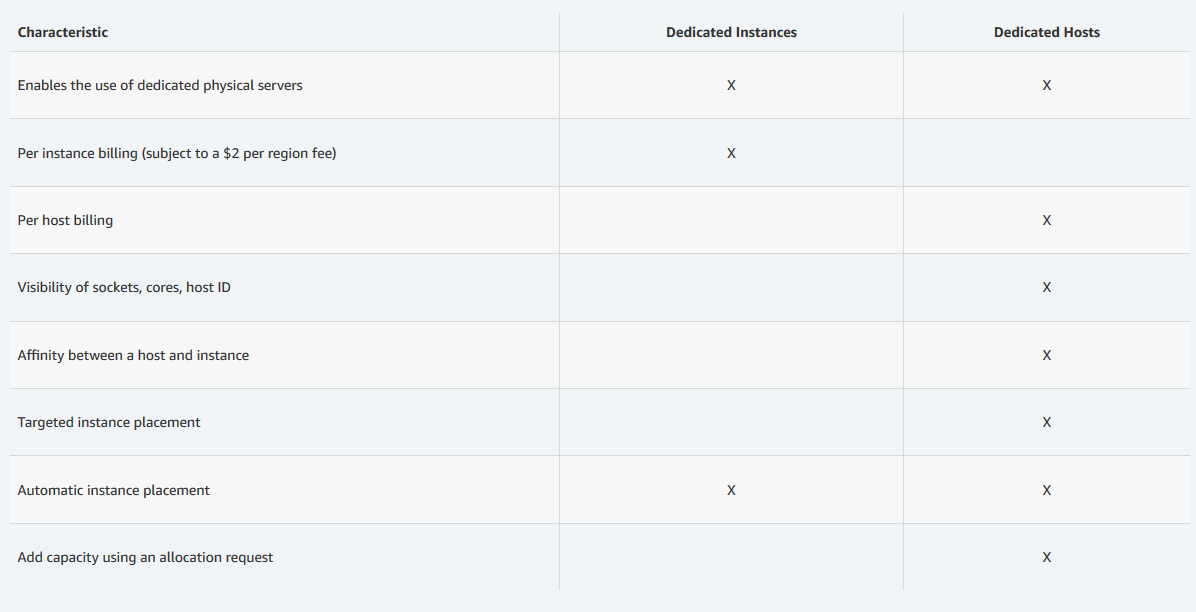
You can use Dedicated Hosts and Dedicated instances to launch Amazon EC2 instances on physical servers that are dedicated to your use. An important difference between a Dedicated Host and a Dedicated instance is that a Dedicated Host gives you additional visibility and control over how instances are placed on a physical server, and you can consistently deploy your instances to the same physical server over time. As a result, Dedicated Hosts enable you to use your existing server-bound software licenses and address corporate compliance and regulatory requirements.
You have the option to launch instances onto a specific Dedicated Host, or you can let Amazon EC2 place the instances automatically. Controlling instance placement allows you to deploy applications to address licensing, corporate compliance, and regulatory requirements.
Dedicated Hosts vs Dedicated instances
Dedicated Instances purchasing option
Although Dedicated instances also run on dedicated hardware, Dedicated Hosts provide further visibility and control by allowing you to place your instances on a specific, physical server.
On-Demand Instances purchasing option
This only enables you to pay for compute capacity per hour or per second depending on which instances you run. You cannot use your existing server-bound software licenses with this option.
Reserved Instances purchasing option
With Reserved Instances purchasing option, you would not be able to use your existing server-bound software licenses with this one. You have to use a Dedicated Host instead.
References: