AWS CCP Notes By Me
- Cloud Computing
- AWS Globla Infrastructure
- AWS Services
- IAM Section – Summary
- IAM - Identity and Access Management
- Compute Services
- Amazon EC2
- EC2 Section – Summary
- Introduction
- EC2 sizing & configuration options
- Security Groups
- EC2 Instances Purchasing Options
- On-Demand Instances
- EC2 Reserved Instances
- EC2 Spot Instances
- EC2 Dedicated Hosts
- EC2 Dedicated Instances
- Which purchasing option is right for me?
- Shared Responsibility Model for EC2
- Amazon EC2
- Storage Services
- Security and Compliance
- AWS Shared Responsibility Model
- DDOS(Distributed Denial-of-Service) Attack Protection on AWS
- Penetration Testing on AWS Cloud
- Encryption and AWS KMS (Key Management Service)
- AWS Secrets Manager
- Artifact - Security and Compliance Documents Provider Service
- GuardDuty
- Amazon Inspector
- AWS Config
- Amazon Macie
- Network Services (VPC)
- VPC Summary
- VPC & SUBNETS
- Internet Gateways
- NAT Gateways and NAT Instances
- Default VPC
- Network Security: Security Groups and NACL
- Comparison of security groups and network ACLs
- VPC Flow Logs
- VPC Peering (Peering Connections)
- VPC Endpoints (Endpoints under VPC Dashboard)
- Site to Site VPN and Direct Connect
- Transit Gateway
- Billing and Pricing
- Exam Notes
Cloud Computing
Six Advantages of Cloud Computing
Trade capital expense for variable expense- Pay On-Demand: don’t own hardware
- Reduced Total Cost of Ownership (TCO) & Operational Expense (OPEX)
- you can pay only when you consume computing resources, and pay only for how much you consume
Benefit from massive economies of scale: Prices are reduced as AWS is more efficient due to large scaleStop guessing capacity: Scale based on actual measured usageIncrease speed and agilityStop Spending money running and maintaining data centersGo Global in Minutes: Leverage the AWS global infrastructure
Five Characteristics of Cloud Computing
On-demand Self Service- Users can provision resources and use them without human interaction from the service provider
Broad Network Access- Resources available over the network, and can be accessed by diverse client platforms
Multi-Tenancy and Resource Pooling- Multiple customers can share the same infrastructure and applications with security and privacy
- Multiple customers are serviced from the same physical resources
Rapid Elasticity and Scalability- Automatically and quickly acquire and dispose resources when needed
- Quickly and easily scale based on demand.
Measured Service- Usage is measured, users pay correctly for what they have used
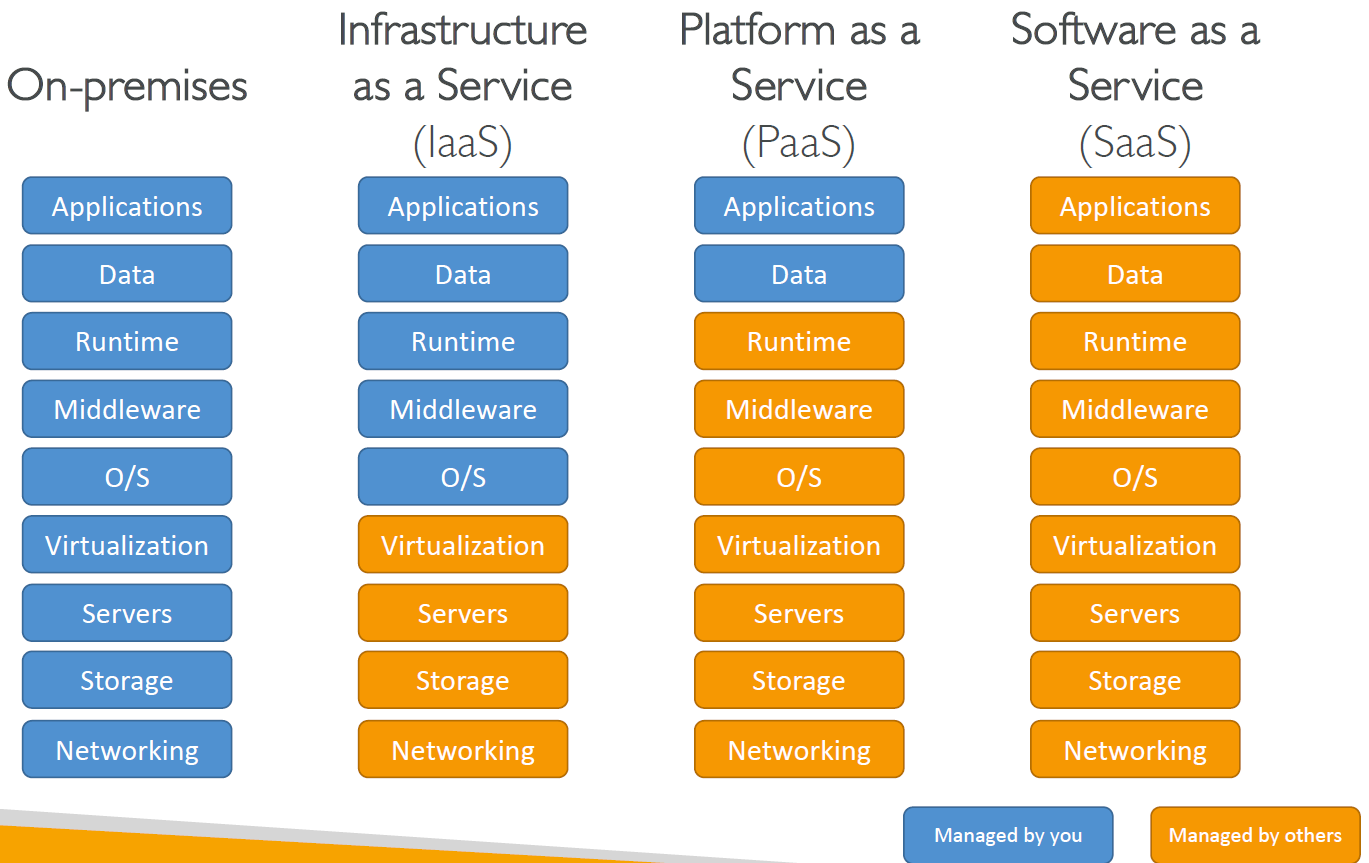
Cloud Computing Models
Infrastructure as a Service (IaaS)- Provide building blocks for cloud IT
- Provides networking, computers, data storage space
- Highest level of flexibility
- Easy parallel with traditional on-premises IT
- Amazon EC2 (on AWS), GCP, Azure, Rackspace, Digital Ocean, Linode
Platform as a Service (PaaS)- Removes the need for your organization to manage the underlying infrastructure
- Focus on the deployment and management of your applications
- Elastic Beanstalk (on AWS), Heroku, Google App Engine (GCP), Windows Azure (Microsoft)
Software as a Service (SaaS)- Completed product that is run and managed by the service provider
- Many AWS services (ex: Rekognition for Machine Learning), Google Apps (Gmail), Dropbox, Zoom
Pricing of the Cloud - Overview
AWS has 3 pricing fundamentals, following the pay-as-you-go pricing model
Compute: Pay for compute timeStorage: Pay for data stored in the CloudData transfer OUT of the Cloud- Data transfer IN is free
Solves the expensive issue of traditional IT.
AWS Globla Infrastructure
AWS Regions
- AWS has Regions all around the world
- Names can be us-east-1, eu-west-3…
- A region is a cluster of data centers
- Most AWS services are region-scoped
https://aws.amazon.com/about-aws/global-infrastructure/
AWS Availability Zones
- Each region has many availability zones
(usually 3, min is 2, max is 6). Example:
- ap-southeast-2a
- ap-southeast-2b
- ap-southeast-2c
- Each availability zone (AZ) is one or more discrete data centers with redundant power,networking, and connectivity.
- They’re separate from each other, so that they’re isolated from disasters.
- They’re connected with high bandwidth, ultra-low latency networking.
AWS Edge Locations / Points of Presence
- Amazon has 216 Points of Presence (205 Edge Locations & 11 Regional Caches) in 84 cities across 42 countries
- Content is delivered to end users with lower latency
AWS Services
IAM Section – Summary
Users: mapped to a physical user, has a password for AWS ConsoleGroups: contains users onlyPolicies: JSON document that outlines permissions for users or groupsRoles: for EC2 instances or AWS servicesSecurity: MFA + Password PolicyAccess Keys: access AWS using the CLI or SDKAudit: IAM Credential Reports & IAM Access Advisor
IAM - Identity and Access Management
- Global Service
- Root Account Created By Default, should not be used or shared
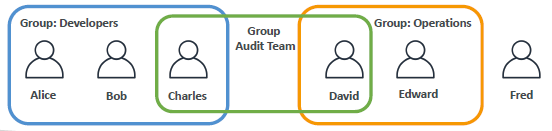
- Users are People
- Groups only contain users, not other groups
- Users don’t have to belong to a group, and user can belong to multiple groups
IAM Permissions
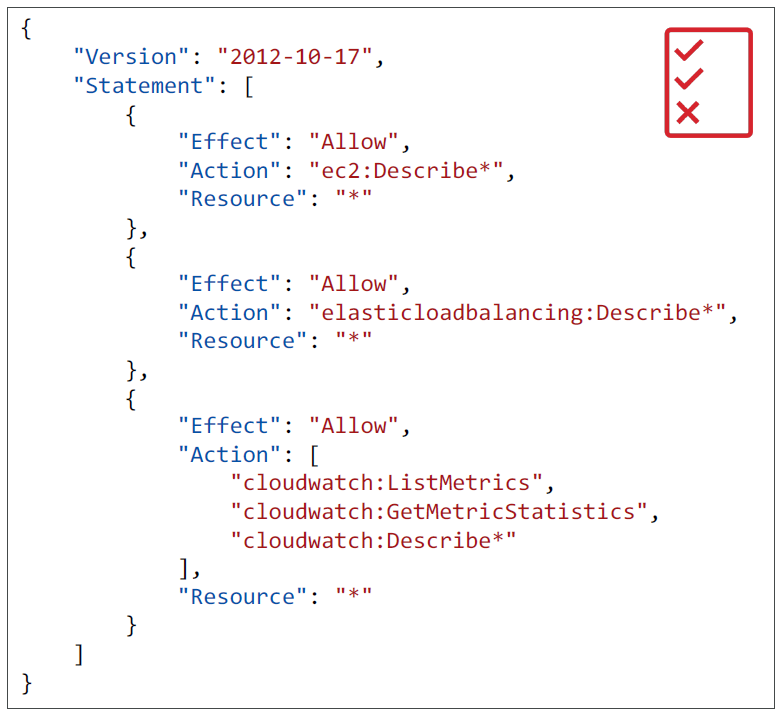
- Users or Groups can be assigned JSON documents called policies
- These policies define the permissions of the users
- In AWS you apply the least privilege principle: don’t give more permissions than a user needs
IAM – Password Policy
Strong passwords = higher security for your account
In AWS, you can setup a password policy:
- Set a minimum password length
- Require specific character types:
- including uppercase letters
- lowercase letters
- numbers
- non-alphanumeric characters
- Allow all IAM users to change their own passwords
- Require users to change their password after some time (password expiration)
- Prevent password re-use
Multi Factor Authentication - MFA
- Users have access to your account and can possibly change configurations or delete resources in your AWS account
- You want to protect your Root Accounts and IAM users
- MFA = password you know + security device you own
Main benefit of MFA: if a password is stolen or hacked, the account is not compromised
MFA devices options in AWS
- Virtual MFA device - Support for multiple tokens on a single device.
- Google Authenticator (phone only)
- Authy (multi-device)
- Universal 2nd Factor (U2F) Security Key - Support for multiple root and IAM users
using a single security key
- YubiKey by Yubico (3rd party)
- Hardware Key Fob MFA Device -Provided by Gemalto (3rd party)
- Hardware Key Fob MFA Device for AWS GovCloud (US) - Provided by SurePassID (3rd party)
AWS Access
- Ways to Access AWS:
- AWS Management Console (protected by password + MFA)
- AWS Command Line Interface (CLI): protected by access keys
- AWS Software Developer Kit (SDK) - for code: protected by access keys
- Access Keys are generated through the AWS Console
- Users manage their own access keys
Access Keys are secret, just like a password. Don’t share them
- Access Key ID ~= username
- Secret Access Key ~= password
- Remember: don’t share your access keys
IAM Roles for Services
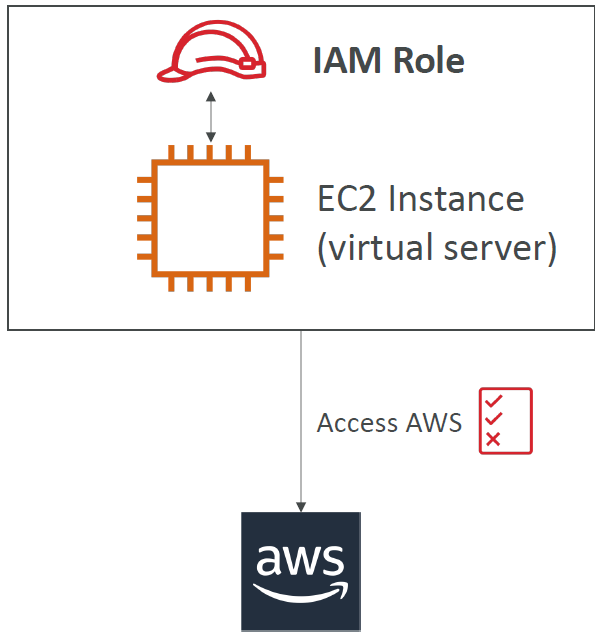
- Some AWS service will need to perform actions on your behalf. To do so, we will assign permissions to AWS services with IAM Roles.
- Common IAM roles:
- EC2 Instance Roles
- Lambda Function Roles
- Roles for CloudFormation
- Temporary Access Rights for the Entity
IAM Security Tools
IAM Credentials Report (account-level)
- A report that lists all your account’s users and the status of their various credentials
IAM Access Advisor (user-level)
- Access advisor shows the service permissions granted to a user and when those services were last accessed.
- You can use this information to revise your policies.
IAM Guidelines & Best Practices
- Don’t use the root account except for AWS account setup
- One physical user = One AWS user
- Assign users to groups and assign permissions to groups
- Create a strong password policy
- Use and enforce the use of Multi Factor Authentication (MFA)
- Create and use Roles for giving permissions to AWS services
- Use Access Keys for Programmatic Access (CLI / SDK)
- Audit permissions of your account with the IAM Credentials Report
- Never share IAM users & Access Keys
Shared Responsibility Model for IAM
| AWS | AWS USERS (YOU) |
|---|---|
| Infrastructure (global network security) | Users, Groups, Roles, Policies management and monitoring |
| Configuration and vulnerability analysis | Enable MFA on all accounts |
| Compliance validation | Rotate all your keys often |
| Use IAM tools to apply appropriate permissions | |
| Analyze access patterns & review permissions |
Compute Services
Amazon EC2
EC2 Section – Summary
EC2 Instance: AMI (OS) + Instance Size (CPU + RAM) + Storage + security groups + EC2 User DataSecurity Groups: Firewall attached to the EC2 instanceEC2 User Data: Script launched at the first start of an instanceSSH: start a terminal into our EC2 Instances (port 22)EC2 Instance Role: link to IAM rolesPurchasing Options: On-Demand, Spot, Reserved (Standard + Convertible + Scheduled), Dedicated Host, Dedicated Instance
Introduction
- EC2 is one of the most popular of AWS’ offering
- EC2 = Elastic Compute Cloud = Infrastructure as a Service
- It mainly consists in the capability of :
- Renting virtual machines (EC2)
- Storing data on virtual drives (EBS)
- Distributing load across machines (ELB)
- Scaling the services using an auto-scaling group (ASG)
- Knowing EC2 is fundamental to understand how the Cloud works
EC2 sizing & configuration options
- Operating System (OS): Linux or Windows
- How much compute power & cores (CPU)
- How much random-access memory (RAM)
- How much storage space:
Network-attached (EBS & EFS)hardware (EC2 Instance Store)
- Network card: speed of the card, Public IP address
- Firewall rules:
security group - Bootstrap script (configure at first launch):
EC2 User Data
Security Groups

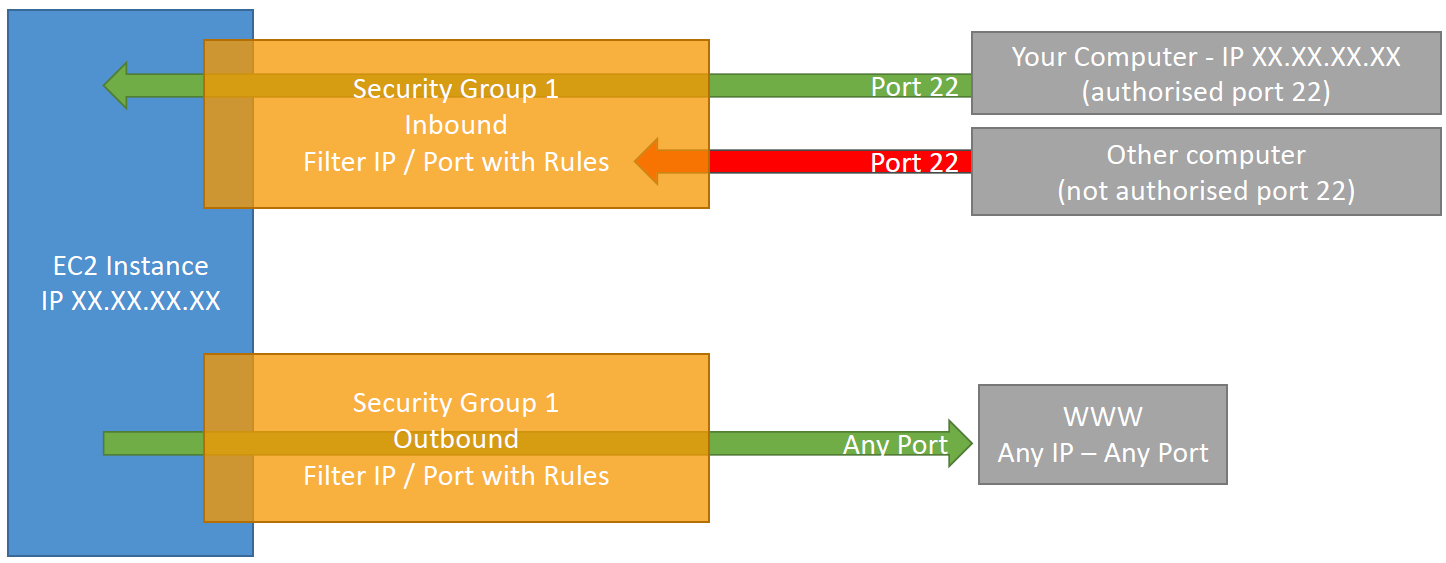
- Security Groups are the fundamental of network security in AWS
- They control how traffic is allowed into or out of our EC2 Instances.
- Security groups only contain
allowrules - Security groups rules can reference by IP or by security group
- Security groups are acting as a “firewall” on EC2 instances
- They regulate:
- Access to Ports
- Authorised IP ranges – IPv4 and IPv6
- Control of inbound network (from other to the instance)
- Control of outbound network (from the instance to other)
Classic Ports to know
- 22 = SSH (Secure Shell) - log into a Linux instance
- 21 = FTP (File Transport Protocol) – upload files into a file share
- 22 = SFTP (Secure File Transport Protocol) – upload files using SSH
- 80 = HTTP – access unsecured websites
- 443 = HTTPS – access secured websites
- 3389 = RDP (Remote Desktop Protocol) – log into a Windows instance
EC2 Instances Purchasing Options
On-Demand Instances: short workload, predictable pricingReserved: (MINIMUM 1 year)Reserved Instances: long workloadsConvertible Reserved Instances: long workloads with flexible instancesScheduled Reserved Instances: example – every Thursday between 3 and 6 pm
Spot Instances: short workloads, cheap, can lose instances (less reliable)Dedicated Hosts: book an entire physical server, control instance placementDedicated Instances: no other customers will share your hardware
On-Demand Instances
- Pay for what you use:
- Linux - billing per second, after the first minute
- All other operating systems (ex: Windows) - billing per hour
- Has the highest cost but no upfront payment
- No long-term commitment
- Recommended for short-term and un-interrupted workloads, where you can’t predict how the application will behave
EC2 Reserved Instances
- Up to 72% discount compared to On-demand
-
Reservation period: 1 year = + discount 3 years = +++ discount -
Purchasing options: no upfront partial upfront = + All upfront = ++ discount - Reserve a specific instance type
- Recommended for steady-state usage applications (think database)
- Convertible Reserved Instance
- can change the EC2 instance type
- Up to 45% discount
- Scheduled Reserved Instances
- launch within time window you reserve
- When you require a fraction of day / week / month
- Commitment for 1 year only
EC2 Spot Instances
- Can get a discount of up to 90% compared to On-demand
- Instances that you can “lose” at any point of time if your max price is less than the current spot price
- The MOST cost-efficient instances in AWS
- Useful for workloads that are resilient to failure
- Batch jobs
- Data analysis
- Image processing
- Any distributed workloads
- Workloads with a flexible start and end time
- Not suitable for critical jobs or databases
EC2 Dedicated Hosts
- An Amazon EC2 Dedicated Host is a physical server with EC2 instance capacity fully dedicated to your use.
- Dedicated Hosts can help you address compliance requirements and reduce costs by allowing you to use your existing server-bound software licenses.
- Allocated for your account for a 3-year period reservation
- More expensive
- Useful for software that have complicated licensing model (BYOL – Bring Your Own License)
- Useful for companies that have strong regulatory or compliance needs
EC2 Dedicated Instances
- Instances running on hardware that’s dedicated to you
- May share hardware with other instances in same account
- No control over instance placement (can move hardware after Stop / Start)
Which purchasing option is right for me?
On demand: coming and staying in resort whenever we like, we pay the full priceReserved: like planning ahead and if we plan to stay for a long time, we may get a good discount.Spot instances: the hotel allows people to bid for the empty rooms and the highest bidder keeps the rooms. You can get kicked out at anytimeDedicated Hosts: We book an entire building of the resort
Shared Responsibility Model for EC2
| AWS | AWS USERS (YOU) |
|---|---|
| Infrastructure (global network security) | Security Groups rules |
| Isolation on physical hosts | Operating-system patches and updates |
| Replacing faulty hardware | Software and utilities installed on the EC2 instance |
| Compliance validation | IAM Roles assigned to EC2 & IAM user access management |
| Data security on your instance |
Storage Services
EBS
An EBS (Elastic Block Store) Volume is a network drive you can attach to your instances while they run
- It allows your instances to persist data, even after their termination
- They can only be mounted to one instance at a time (at the CCP level)
- They are bound to a specific availability zone
- Analogy: Think of them as a “network USB stick”
It’s a network drive (i.e. not a physical drive)
- It uses the network to communicate the instance, which means there might be a bit of latency
- It can be detached from an EC2 instance and attached to another one quickly
It’s locked to an Availability Zone (AZ)
- An EBS Volume in us-east-1a cannot be attached to us-east-1b
- To move a volume across, you first need to snapshot it
Have a provisioned capacity (size in GBs, and IOPS)
- You get billed for all the provisioned capacity
- You can increase the capacity of the drive over time
EBS Snapshots
- Make a backup (snapshot) of your EBS volume at a point in time
- Not necessary to detach volume to do snapshot, but recommended
- Can copy snapshots across AZ or Region
EFS – Elastic File System
- Managed NFS (network file system) that can be mounted on 100s of EC2
- EFS works with Linux EC2 instances in multi-AZ
- Highly available, scalable, expensive (3x gp2), pay per use, no capacity planning
EC2 Instance Store
- EBS volumes are network drives with good but “limited” performance
- If you need a high-performance hardware disk, use
EC2 Instance Store - Better I/O performance
- EC2 Instance Store lose their storage if they’re stopped (ephemeral)
- Good for buffer / cache / scratch data / temporary content
- Risk of data loss if hardware fails
- Backups and Replication are your responsibility
EFS
Amazon EFS is a regional service storing data within and across multiple Availability Zones (AZs) for high availability and durability.
- Managed NFS (network file system) that can be mounted on 100s of EC2
- EFS works with Linux EC2 instances in multi-AZ
- Highly available, scalable, expensive (3x gp2), pay per use, no capacity planning
Amazon EC2 instances can access your file system across AZs, regions, and VPCs, while on-premises servers can access using AWS Direct Connect or AWS VPN.
EC2 Instance Storage - Summary
EBS volumes:
- network drives attached to one EC2 instance at a time
- Mapped to an Availability Zones
- Can use EBS Snapshots for backups / transferring EBS volumes across AZ
AMI: create ready-to-use EC2 instances with our customizations
EC2 Instance Store:
- High performance hardware disk attached to our EC2 instance
- Lost if our instance is stopped / terminated
EFS: network file system, can be attached to 100s of instances in a region
Security and Compliance
Shared Responsibility on AWS- AWS Shared Responsibility ModelShield: Automatic DDoS Protection + 24/7 support for advancedWAF: Firewall to filter incoming requests based on rulesPenetration Testing- Not allowed for DNS zone walking via Amazon Route 53 Hosted Zones Denial of Service (DoS), Distributed Denial of Service (DDoS), Simulated DoS, Simulated DDoS (These are subject to the DDoS Simulation Testing policy), Port flooding, Protocol flooding, Request flooding (login request flooding, API request flooding)KMS: Encryption keys managed by AWSCloudHSM: Hardware encryption, we manage encryption keysArtifact: Get access to compliance reports such as PCI, ISO, etc…GuardDuty: Find malicious behavior with VPC, DNS & CloudTrail LogsInspector: For EC2 only, install agent and find vulnerabilitiesConfig (Resource Level): Track Resource config changes and compliance against rulesMacie: Find sensitive data (ex: PII data) in Amazon S3 bucketsCloudTrail (Account Level): Track API calls made by users within account
AWS Shared Responsibility Model
AWS Responsibility - Security of the Cloud
- Protecting Infrastructure (hardware, softwarer, facilities, and networking) that runs all the AWS Services
- Managed Services like S3, DynamoDb, RDS, Lambda, etc.
- Physical and Environmental controls
Customer Responsibility - Security in the Cloud
- For EC2 instance, customer is responsible for management of the guest OS (including security patches and updates), firewall & network configuration, IAM.
- managing their data (including encryption options), classifying their assets, and using IAM tools to apply the appropriate permissions.
- Service and Communications Protection or Zone Security which may require a customer to route or zone data within specific security environments.
AWS and Customer Shared Responsibility - Controls which apply to both the infrastructure layer and customer layers, but in completely separate contexts or perspectives. In a shared control, AWS provides the requirements for the infrastructure and the customer must provide their own control implementation within their use of AWS services.
Patch Management– AWS is responsible for patching and fixing flaws within the infrastructure, but customers are responsible for patching their guest OS and applications.Configuration Management– AWS maintains the configuration of its infrastructure devices, but a customer is responsible for configuring their own guest operating systems, databases, and applications.Awareness & Training- AWS trains AWS employees, but a customer must train their own employees.
DDOS(Distributed Denial-of-Service) Attack Protection on AWS
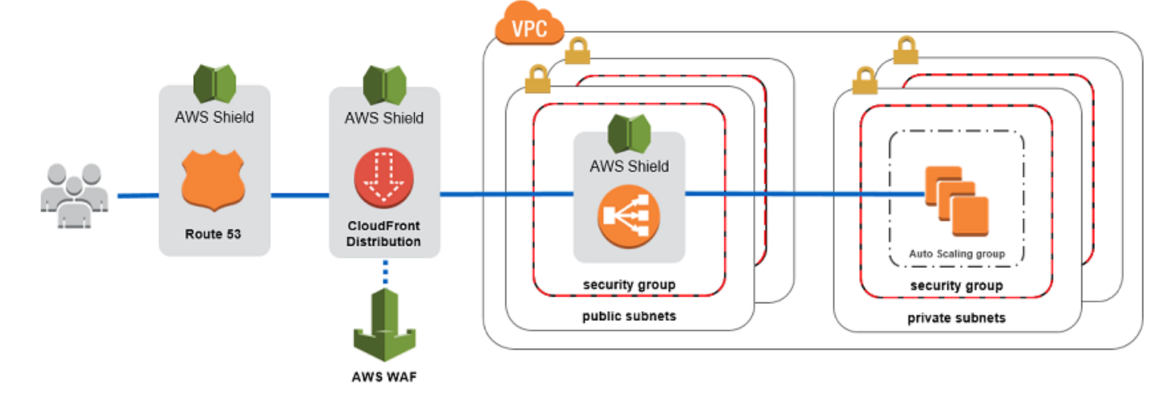
AWS Shield Standard- Protects against DDOS attack for your website and applications, for all customers at no additional cost
AWS Shield Advanced- 24/7 premium DDoS ProtectionAWS WAF- Filter specific requests based on rulesCloudFront and Route53- Availability Protection using global edge network
- Combined with AWS Shield, provides attack mitigation at the edge
Be Ready To Scale- Leverage AWS Auto Scaling
AWS Shield
AWS Shild Standard
- Free Service that is activated for every AWS Customer.
- Provides protection from attacks such as SYN/UDP Floods, Reflection attacks and other Layer 3/Layer 4 attacks.
AWS Shild Advanced - High Level of Defense
- Optional DDoS mitigation service ($3000 Per month per Organization)
- Protect against more sophisticated attack on Amazon EC2, Elastic Load Balancer(ELB), CloudFront, Global Accelerator, and Route53.
- 24/7 access to AWS DDoS response team (DRP)
- Protect against higher fees during usage spikes due to DDoS.
AWS WAF - Web Application Firewall
- Protects your web applications from common web exploits (Layer 7)
- Layer 7 is HTTP (vs. Layer 4 is TCP)
- Deploy on Application Load Balacer (ALB), API Gateway, CloudFront
- Define Web ACL (Web Access Control List):
- Filtering Rules can include IP Addresses, HTTP Headers, HTTP Body, or URI Strings
- Protects from common attack - SQL Injection and Cross-Site Scripting (XSS)
- Size Contraints (Requests are not so big), geo-match (block countries)
- Rate-based rules (to count the occurences of events - ex: user can not do more than 5 requests per second) - For DDoS Protection
Exam Notes - It is a combination of Shield, WAF, CloudFront, Route53, they will give you an entire DDoS Protection.
Penetration Testing on AWS Cloud
- It is to attack your own infrastructure to test the security of your infrastructure
- Customer can carry out penetration tests against their AWS Infrastructure for 8 Services without Prior Approval:
- AWS EC2 Instances, NAT Gateways, and Elastic Load Balancers
- Amazon RDS
- Amazon CloudFront
- Amazon Aurora
- Amazon API Gateway
- AWS Lambda and Lambda Edge Funtions
- Amazon Lightsail Resources
- Amazon Elastic Beanstalk Environments
- Prohibited Activities
- DNS zone walking via Amazon Route 53 Hosted Zones Denial of Service (DoS), Distributed Denial of Service (DDoS), Simulated DoS, Simulated DDoS (These are subject to the DDoS Simulation Testing policy)
- Port flooding
- Protocol flooding
- Request flooding (login request flooding, API request flooding)
- Requesting Authorization for Other Simulated Events
- Please email directly at aws-security-simulated-event@amazon.com
Encryption and AWS KMS (Key Management Service)
- KMS - AWS Manages the encryption keys for us
- Encryption Optional (Voluntary Opt-in for Encryption)
- EBS Volumes - encrypt volumes
- S3 Buckets - encrypt objects
- Redshift - encryption of data
- RDS Dat - encryption of data
- EFS Drive - encryption of data
Exam Notes:
- Encryption Automatically Enabled Services:
- CloudTrail Logs
- S3 Glacier
- Storage Gateway
CloudHSM
- When Customer wants to manage their Encryption Keys, CloudHSM is useful.
- AWS Provisions the Dedicated Encryption Hardware (HSM - Hardware Security Module)
- You manage your own encryption keys entirely (not AWS)
- HSM Device is tamper resistant, FIPS 140-2 Level 3 compliance - Internal AWS Employees can’t access that device.
| AWS KMS | CloudHSM |
|---|---|
| AWS manages the software for encryption | AWS provistions encryption hardware - Dedicated Hardware (HSM - Hardware Security Module) |
| AWS’ responsibility to manage the encryption keys | Once the HSM hardware is provisioned by AWS, Customer Managers their own encryption keys entirely |
Types of Encryption Keys
Customer Managed Keys
- Create, manage and use, can enable/disable keys
- Possibility of rotation policy (new key generated every year, old key preserved)
- possibility to bring-your-own-key
AWS Managed Keys
- Used by AWS Services (aws/s3, aws/ebs, aws/redshift)
- Managed by AWS
Custom Key Stores - CloudHSM Keys
- Keys generated from your own CloudHSM hardware device
- Cryptographic operations are performed within the cloudHSM cluster
AWS Secrets Manager
- Meant for Storing Secrets
- Capability to force rotation of secrets every X days
- Automate generation of secrets on rotation (using Lamda Code)
- Integration with Amazon RDS
- Secrets are encrypted using KMS
- Mostly meant for RDS Integration
Exam Notes- Anytime we see secrets to be managing in RDS/DocumentDB/RedShift/Other Database/Other Type of Secrets (API) and to be Rotated, think ofAWS Secrets Manager.
Artifact - Security and Compliance Documents Provider Service
- On-demand Access to download AWS Security and Compliance Documentation and AWS Agreements
- Artifact Reports - allows you to download AWS Security and Compliance Documents like ISO Certification, Payment Card Industry (PCI) reports
- AWS Agreements - allows you to review, accept and track the status of AWS agreements such as Business Associate Addendum (BAA)
- Can be used to support internal audit or compliance.
GuardDuty
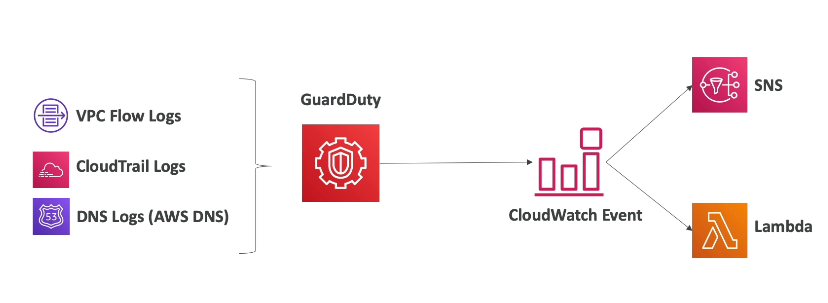
- Intelligent Threat discovery to Protect AWS Account
- Uses Machine Learning algorithms, anomaly detection, 3rd party data
- One click to enable (30 days trial), no need to install software
- Input data includes:
- CloudTrail Logs: unusual API calls, unauthorized deployments
- VPC Flow Logs: unusual internal traffic, unusual IP address
- DNS Logs: compromised EC2 instances sending encoded data within DNS queries
- Can setup CloudWatch Event rules to be notified in case of findings
- CloudWatch Events rules can target AWS Lambda or SNS
Amazon Inspector
- Automated Security Assessments for EC2 instances
- Analyze the running OS against known vulnerabilities
- Analyze against unintended network accessibility
- AWS Inspector Agent must be installed on OS in EC2 instances
- After the assessment, you get a report with a list of vulnerabilities
AWS Config
- Helps with
auditing and recording compliance of your AWS resources - Helps
record configurations and changes over time - Possibility of storing the configuration data into S3 (analyzed by Athena)
- Questions that can be solved by AWS Config:
- Is there unrestricted SSH access to my security groups?
- Do my buckets have any public access?
- How has my ALB configuration changed over time?
- You can
receive alerts (SNS notifications) for any changes - AWS Config is a per-region service
Can be aggregated across regions and accounts
Amazon Macie
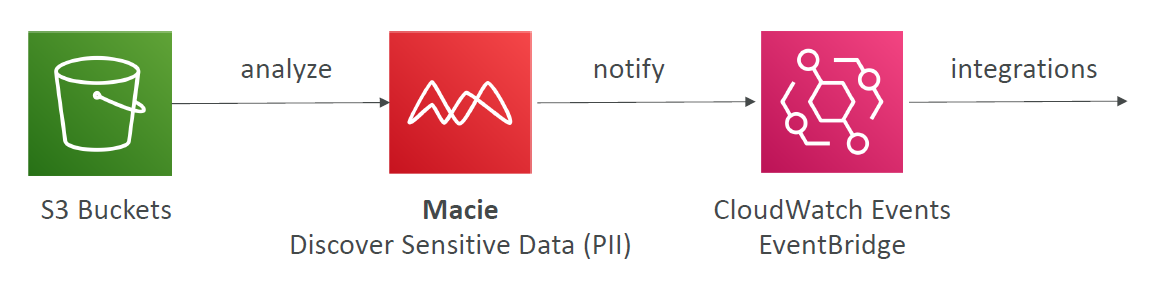
- Amazon Macie is a fully managed data security and data privacy service that uses machine learning and pattern matching to discover and protect your sensitive data in AWS.
- Macie helps identify and alert you to sensitive data, such as personally identifiable information (PII)
Network Services (VPC)
VPC Summary
VPC: Virtual Private CloudSubnets: Tied to an AZ, network partition of the VPCInternet Gateway: at the VPC level, provide Internet AccessNAT Gateway / Instances: give internet access to private subnetsNACL: Stateless, subnet rules for inbound and outboundSecurity Groups: Stateful, operate at the EC2 instance level or ENIVPC Peering: Connect two VPC with non overlapping IP ranges, nontransitiveVPC Endpoints: Provide private access to AWS Services within VPCVPC Flow Logs: network traffic logsSite to Site VPN: VPN over public internet between on-premises DC and AWSDirect Connect: direct private connection to AWSTransit Gateway: Connect thousands of VPC and on-premises networks together
VPC & SUBNETS
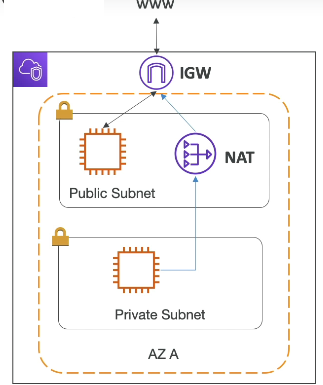
- VPC - private network to deploy your resources, region specific
- Within the vpc, we can have subnets
- Subnets - allows you to partition your network inside your VPC (Availability Zone Resource)
- Public Subnet is a subnet that is accessible from the internet
- Private Subnet is subnet that is not accessible from the internet
- To define access to the internet and between subnets, we use Route Tables
Internet Gateways
- It helps our VPC instances connect with the Internet
- Public subnets will have a route to Internet Gateway
NAT Gateways and NAT Instances
- NAT Gatways(AWS-Managed)/ NAT Instances (Self-Managed) allows our instances in our private subnet to access the internet while remaining private.
Default VPC
- CIDR - 172.31.0.0/16 - 65,536 IPs - private IP Range
- Subnets - Subnets are divided by Availability Zones (AZs) - Same as number of Availablility Zones
Network Security: Security Groups and NACL
- Network ACL (NACL)
- First level of defense
- firewall which controls traffic from and to Subnet
- Can have allow and deny rules
- are attached at Subnet Level
- Rules only include IP address
- Security Groups
- Firewall that controls traffic to and from an ENI(Elastic Network Interface)/an EC2 Instance
- Can only have allow rules
- Rules includes IP Addresses and other security groups
- Security groups stays around EC2 Instance
Comparison of security groups and network ACLs
| Security group | Network ACL |
|---|---|
| Operates at the instance level | Operates at the subnet level |
| Supports allow rules only | Supports allow rules and deny rules |
| Is stateful: Return traffic is automatically allowed, regardless of any rules | Is stateless: Return traffic must be explicitly allowed by rules |
| We evaluate all rules before deciding whether to allow traffic | We process rules in order, starting with the lowest numbered rule, when deciding whether to allow traffic |
| Applies to an instance only if someone specifies the security group when launching the instance, or associates the security group with the instance later on | Automatically applies to all instances in the subnets that it’s associated with (therefore, it provides an additional layer of defense if the security group rules are too permissive) |
https://docs.aws.amazon.com/vpc/latest/userguide/VPC_Security.html
VPC Flow Logs
- Not enabled by default, we have to create vpc flow log.
- Capture information about IP traffic going into your interfaces:
- VPC Flow Logs
- Subnet Flow Logs
- Elastic Network Interface Flow Logs
- Helps to monitor & troubleshoot connectivity issues. Example:
- Subnets to internet
- Subnets to subnets
- Internet to subnets
- Captures network information from AWS managed interfaces too: Elastic Load Balancers, ElastiCache, RDS, Aurora, etc…
- VPC Flow logs data can go to S3 / CloudWatch Logs
VPC Peering (Peering Connections)
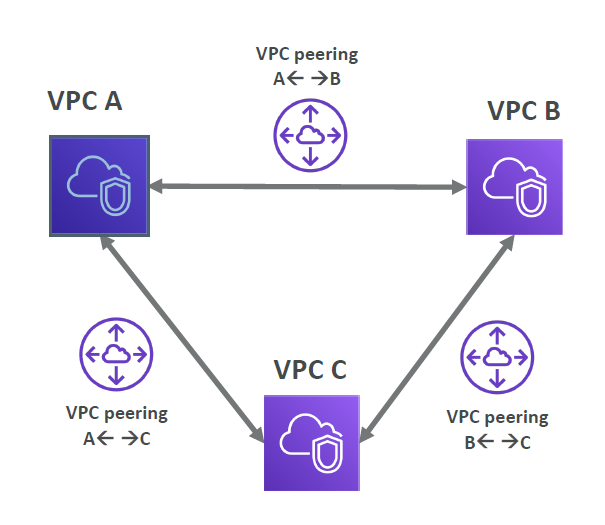
- Connect two VPC, privately using AWS’ network. Can connect two different AWS account VPCs, can connect two different region VPCs
- Make them behave as if they were in the same network
- Must not have overlapping CIDR (IP address range)
- VPC Peering connection is not transitive (must be established for each VPC that need to communicate with one another)
VPC Endpoints (Endpoints under VPC Dashboard)
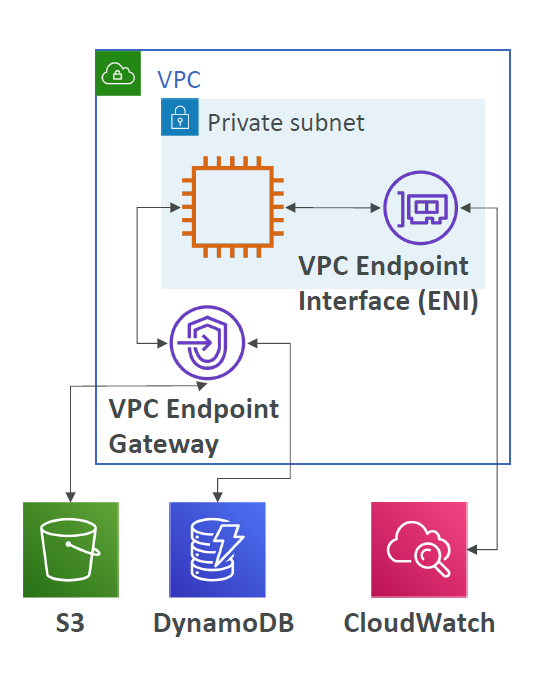
- Help us to connect AWS Services using private AWS Network
- Better security and lower latency to access AWS services
- VPC Endpoint - (Type) Gateway - S3 & DynamoDB
- VPC Endpoint - (Type) Interface - The Rest of the AWS Services
Site to Site VPN and Direct Connect
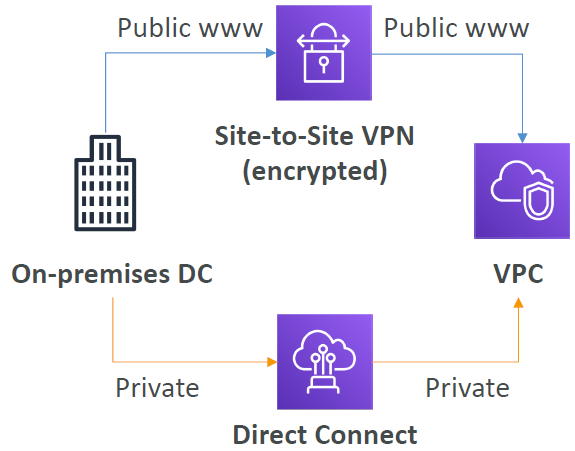
- Site to Site VPN
- Connect an on-premise VPN to AWS
- Encrypted connection
- Connects via public internet - limited bandwidth & security concerns even though it is connected via encrypted line.
- Can setup connection in 5 mins between on-premise and AWS.
- Need high speed internet
- To Establish a Site to Site VPN:

- On-premises: must use a Customer Gateway (CGW)
- AWS: must use a Virtual Private Gateway (VGW)
- Direct Connect (DX)
- Establish a physical connection between on-premise and AWS
- Connection is private, secure and fast
- Connects via private Network
- Takes a atleast a month to establish connectivity
Transit Gateway
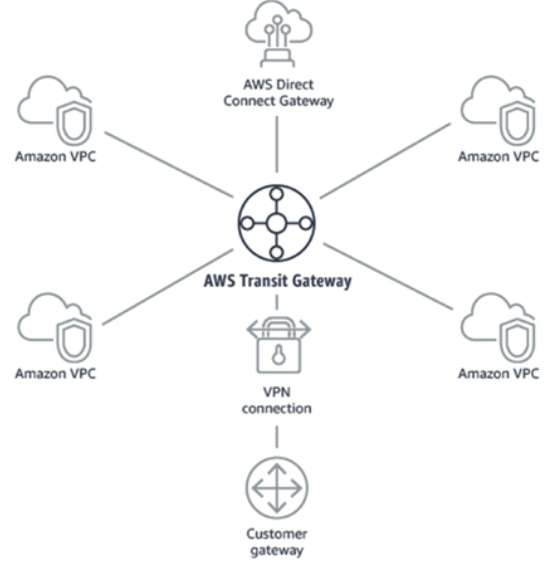
- For having transitive peering connections between thousands of VPC and on-premises, hub-and-spoke(star) connection.
- One single Gateway to provide this functionality
- Works with Direct Connect Gateway, VPN connections
Billing and Pricing
Exam Notes
activity, auditing and Control
You may see use-cases asking you to select one of CloudWatch vs CloudTrail vs Config. Just remember this thumb rule.
Think resource performance monitoring, events, and alerts; think CloudWatch.
Think account-specific activity and audit; think CloudTrail.
Think resource-specific change history, audit, and compliance; think Config.
DDoS Protection
It is a combination of Shield, WAF, CloudFront, Route53, they will give you an entire DDoS Protection.
Hybrid Services - with on-premise operations support
CodeDeploy - It is a service that automates code deployments to any instance, including EC2 instances and instances running on premises.
Transit Gateway - One single Gateway to provide transitive peering connections between thousands of VPC and on-premises, hub-and-spoke(star) connection. it works with Direct Connect Gateway, VPN connections.
Hybrid Services - Migration Services
If it takes more than a week to transfer over the network, use Snowball devices!
AWS Snowball (Only Storage) “Snowball” is deprecated in favor of “Snowball Edge” |
AWS Snowball Edge (Storage + Compute) | AWS Snowmobile |
|---|---|---|
| Physical data transport solution that helps moving TBs or PBs of data in or out of AWS | Snowball Edges (100 TB) add computational capability to the device | Transfer exabytes of data (1 EB = 1,000 PB = 1,000,000 TBs) |
| Alternative to moving data over the network (and paying network fees) | Supports a custom EC2 AMI so you can perform processing on the go | Each Snowmobile has 100 PB of capacity (use multiple in parallel) |
| Pay per data transfer job | Supports custom Lambda functions | Better than Snowball if you transfer more than 10 PB |
| Use cases: large data cloud migrations, DC decommission, disaster recovery | Very useful to pre-process the data while moving | |
| Use case: data migration, image collation, IoT capture, machine learning |
Hybrid Services - Database Migration Service - DMS
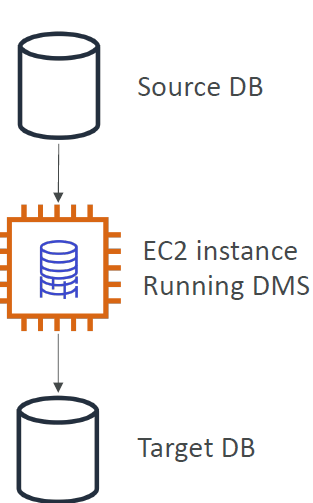
Quickly and securely migrate databases to AWS, resilient, self healing The source database remains available during the migration Supports:
- Homogeneous migrations: ex Oracle to Oracle
- Heterogeneous migrations: ex Microsoft SQL Server to Aurora
On-premise connectivity with AWS
| Site to Site VPN | Direct Connect (DX) |
|---|---|
| Connect an on-premise VPN to AWS | Establish a physical connection between on-premise and AWS |
| Encrypted Connection via public internet with security concerns and network hops | Connection is private, secure and fast |
| Can setup connection in 5 mins between on-premise and AWS. | Takes a atleast a month to establish connectivity |
Hybrid Cloud for Storage - AWS Storage Gateway
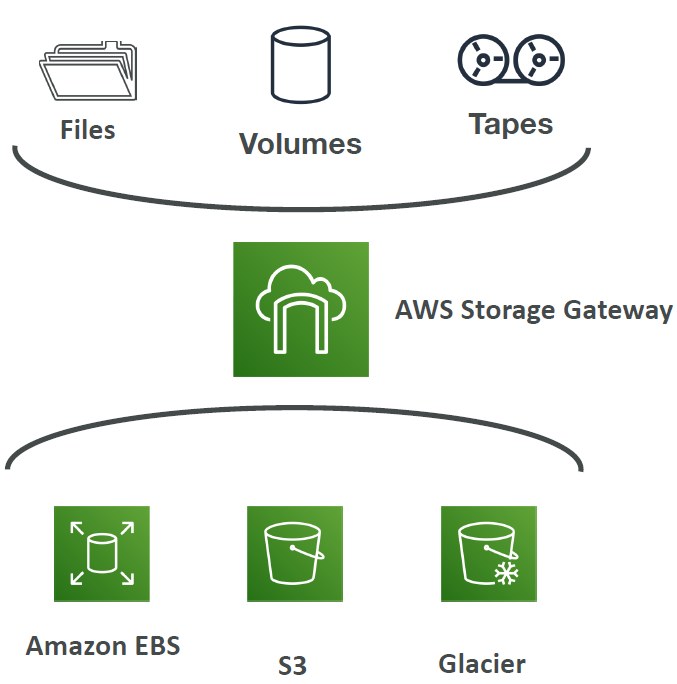
S3 is a proprietary storage technology (unlike EFS / NFS), so how do you expose the S3 data on-premise? - AWS Storage Gateway!
- Bridge between on-premise data and cloud data in S3
- Hybrid storage service to allow onpremises to seamlessly use the AWS Cloud
- Use cases: disaster recovery, backup & restore, tiered storage
- Types of Storage Gateway:
- File Gateway
- Volume Gateway
- Tape Gateway
- No need to know the types at the exam
Global Services
Most of the services that AWS offers are Region specific. But few services, by definition, need to be in a global scope because of the underlying service they offer. AWS IAM, Amazon CloudFront, Route 53 and WAF are some of the global services.
- AWS IAM
- AWS Route53
- Amazon CloudFront
- AWS Direct Connect
- AWS WAF & Shield
- AWS Artifact
- AWS Trusted Advisor
- AWS Personal Health Dashboard
Amazon S3 - Amazon S3 is a unique service in the sense that it follows a global namespace but the buckets are regional. You specify an AWS Region when you create your Amazon S3 bucket. This is a regional service.
Region Table: https://aws.amazon.com/about-aws/global-infrastructure/regional-product-services
Storage Types
Block Storage- Amazon EBS, EC2 Instance StoreFile Storage- Amazon EFS - this is a type of POSIX-compliant file storage suitable to be used as a file system and not for storing backups.Object Stroage- Amazon S3, Glacier
AWS Professional Services - collection of offerings to help you achieve specific business outcomes related to enterprise cloud adoption through paid engagements in several specialty practice areas
AWS Professional Services shares a collection of offerings to help you achieve specific outcomes related to enterprise cloud adoption. Each offering delivers a set of activities, best practices, and documentation reflecting our experience supporting hundreds of customers in their journey to the AWS Cloud. AWS Professional Services’ offerings use a unique methodology based on Amazon’s internal best practices to help you complete projects faster and more reliably while accounting for evolving expectations and dynamic team structures along the way.
AWS Professional Services created the AWS Cloud Adoption Framework (AWS CAF) to help organizations design and travel an accelerated path to successful cloud adoption. The guidance and best practices provided by the framework help you build a comprehensive approach to cloud computing across your organization, and throughout your IT lifecycle. Using the AWS CAF helps you realize measurable business benefits from cloud adoption faster and with less risk.
Disaster Recovery Service
CloudEndure Disaster Recovery is a tool that minimizes downtime and data loss by providing fast, reliable recovery of physical, virtual, and cloud-based servers into AWS Cloud. You can also use CloudEndure Disaster Recovery to protect your most critical SQL databases thanks to the continuous replication of your machines into a low-cost staging area in your target AWS account and preferred Region. In the case of a disaster, CloudEndure Disaster Recovery can automatically launch your machines in their fully provisioned state in minutes.
Things to Revise at Last Minute
Support and Related Services
AWS Personal Health Dashboard- Personalized view of the health of AWS Services- available for all the support plan
Business hours email access to cloud support-DeveloperSupport and above-
Unlimited Cases / 1 Primary Contact-DeveloperSupport and above AWS Trusted Advisor- 7 Core checks for
BasicandDeveloperSupport - Full set of checks for
BusinessandEnterpriseSupport
- 7 Core checks for
AWS Support APIandThird-Party Software Support( Interoperability & configuration guidance and troubleshooting )- Available to
BusinessandEnterpriseSupport
- Available to
24×7 phone, email, and chat access to Cloud Support Engineers Unlimited cases / unlimited contacts (IAM supported)- Available to
BusinessandEnterpriseSupport
- Available to
AWS Infrastructure Event ManagementEnterprise Supportcustomers (andBusiness Support customersfor an additional fee)- Helps you plan for large-scale events such as product or application launches, infrastructure migrations, and marketing events
Technical Account Manager (TAM)- Available toEnterprise Support- Technical point of contact who provides advocacy and guidance to assist you in planning and building solutions in AWS using industry best practices. This person proactively coordinates and liaises your concerns to subject matter experts and product teams to ensure that your AWS environment operates optimally.
Concierge Support Team- for billing and account related queries and best practices- Available to
Enterprise Support
- Available to
APN Partners-
APN Consulting Partnershelp customers of all sizes design, architect, migrate, or build new applications on AWS. Consulting Partners include System Integrators (SIs), Strategic Consultancies, Resellers, Digital Agencies, Managed Service Providers (MSPs), and Value-Added Resellers (VARs). -
APN Technology Partnersprovide software solutions that are either hosted on, or integrated with, the AWS platform. Technology Partners include Independent Software Vendors (ISVs), SaaS, PaaS, developer tools, management and security vendors.
-
Billing and Pricing Services
-
The Cost and Usage Reportis your one-stop-shop for accessing the most granular data about your AWS costs and usage. You can also load your cost and usage information into Amazon Athena, Amazon Redshift, AWS QuickSight, or a tool of your choice. -
Consolidated Billingallows you to track the combined costs of all the linked AWS accounts in your organization. This feature does not provide the most granular data about your AWS costs and usage. -
AWS Cost Explorerenables you to view and analyze your costs and usage but not at a granular level like the AWS Cost and Usage report. This service can only forecast your costs based on your previous usage. -
Cost allocation tagis primarily used to make it easier for you to categorize and track your AWS costs by tagging your resources. AWS Budgetsallows you to set custom budgets that alert you when your costs or usage exceed (or are forecasted to exceed) your budgeted amount.- Budgets can be created at the monthly, quarterly, or yearly level, and you can customize the start and end dates. You can further refine your budget to track costs associated with multiple dimensions, such as AWS service, linked account, tag, and others. Budget alerts can be sent via email and/or Amazon Simple Notification Service (SNS) topic.
-
Amazon CloudWatch Billing Alarmallows you to monitor your estimated AWS charges, this service still does not allow you to set coverage targets and receive alerts when your utilization drops below the threshold you define. Cost Estimation for AWS Migration- To estimate the costs of migrating on-premises infrastructure to AWS, you may contact a
Business sales representativeto work with you on your infrastructure migration project. AWS Pricing Calculatoris an easy-to-use online tool that enables you to estimate the monthly cost of AWS services for your use case based on your expected usage. It is continuously updated with the latest pricing for all AWS services in all regions.
- To estimate the costs of migrating on-premises infrastructure to AWS, you may contact a
Technical Services Short Overview
AWS Ground Stationfor controlling satellite communications and processing data using satellites.Amazon Lumberyardis a game engine service for creating games.AWS Security Bulletinis a security announcement provider service.
Hybrid Services
AWS OpsWorks- Managed Chef & Puppet Configuration Service- It is a configuration management service that helps customers configure and operate applications, both on-premises and in the AWS Cloud, using Chef and Puppet.
-
AWS CodeDeployautomates code deployments to any instance, including Amazon EC2 instances and instances running on-premises. AWS CodeDeploy makes it easier to rapidly release new features, avoids downtime during application deployment, and handles the complexity of updating applications. -
Amazon Elastic File System (Amazon EFS)provides a simple, scalable, fully managed elastic NFS file system for use with AWS Cloud services and on-premises resources. AWS Systems Manager(SSM)helps you manage your EC2 and On-premises systems at scale.- Supports Patching updates on EC2/On-premise servers, Run commands across an entire fleet of servers.
- Supports windows and linux both.
Services
AWS Security Token Service- Enables you to create temporary, limited- privileges credentials to access your AWS resources
- Short-term credentials: you configure expiration period
- Use cases:
- Identity federation: manage user identities in external systems, and provide them with STS tokens to access AWS resources
- IAM Roles for cross/same account access
- IAM Roles for Amazon EC2: provide temporary credentials for EC2 instances to access AWS resources
-
AWS CloudShell- Alternative to AWS CLI from your own laptop terminal Amazon FSx- For Windows - fully managed, highly reliable and scalable Windows Native Shared file system
- For Luster (Linux + Cluster)- High Performance Scalable file storage for High Performance Computing like Machine Learning and Etc.
Amazon EMR- Supports hadoop data clustersAthena- Serverless database to perform queries on S3Amazon Quicksight- Fully Managed Business Intelligence service that allows you to create dashboards on the databases . Supports RDS, Aurora, Athena, Redshift, Amazon S3Amazon Document DB- Fully Managed, Highly Available Aurora version for MongoDB NoSQLAmazon Neptune- Fully Managed Graph DatabaseAmazon QLDB- Ledger Recording Financial Transactions which can not be modified or deleted. Amazon Managed Centralized Blockchain DBAmazon Managed Blockchain- Decentralized Managed Blockchain Service Network - Compatible with Ethereum and HyperLedger Fabric.Database Migration Service- Supports Database Migration for SQL and N0SQL Databases- Homogeneous Migration - MySQL to MySQL
- Heterogeneous Migration - Microsoft SQL to Aurora
AWS Glue- Fully Managed Serverless ETL ServiceAmazon API Gateway- Serverless API by API Gateway and Lambda- Fully Managed Serverless Service
- Supports REST and WebSocket API
- Supports API Gateway Functionality
- Client -> API CALL -> API GATEWAY -> Calls the Lambda Function
AWS Batch- Fully Managed Batch Processing Service at any scale.Lightsail- Virtual Private Service - No Cloud Experience - Get started quicklyAWS CDK- Write you infrastructure in your Programming Language-
Elastic Beanstalk- Platform as a Service(PaaS) for Applications CodeCommit- Amazon’s owned Git RepositoryCodeBuild- Amazon’s owned Code Building Service - Like JenkinsAWS CodePipeline- CI/CD Pipeline in AWS (Code->Build->Test->Provision->Deploy)Code Artifact- Fully Managed Artifact Management Repository in AWSCodeStar- Unified best practices UI for CodeCommit, CodeBuild, CodePipeline and etc.AWS Cloud9- Cloud IDE - Web Based IDE - Pair Programming SupportAWS Outposts- Same AWS Infrastructure Services for on premises - support for Hybrid Cloud - AWS Infrastructure Server Racks - Fully Managed ServiceAWS WaveLength Zone- Infrastructure Deployments embedded within the Telecommunication Providers’ datacenters at the edge of the 5G networks - 5G Network SupportAmazon Kinesis- Managed Realtime Big Data Streaming ServiceAmazon MQ- Managed Apache ActiveMQ - useful only for migrationAWS X-Ray- AWS Managed Distributed Tracing, Troubleshooting and Visual Analysis ServiceCodeGuru Reviewer- Performs Automated ML Powered Code Reviews and application Performance Recommendation. Supports Java and PythonCodeGuru Profiler- Helps understand runtime behavior of your application - Supports On-premise and AWSAWS Certificate Manager- Helps you to provision, manage and deploy SSL/TLS CertificatesAWS Security Hub- Security Centralized in multiple AWS accounts- Central Security tool to manage security across several AWS accounts and automate security checks. Automatically Aggregate alerts from GuardDuty, Inspector, Macie, and other similar tools
-
Amazon Detective- Analyzes, investigates and quickly identifies the root cause of security issues or suspicious activities (using ML and Graphs ) AWS Abuse- Report Abusive and Prohibited Behaviors (if found using AWS)Amazon Kendra- Fully managed document search serviceAmazon Personalize- Fully Managed ML service to build apps with real-time personalization recommendations
AWS Other Services
Amazon Workspaces- Managed Desktop as a Service (DaaS) - Windows/Linux - Virtual DesktopsAmazon AppStream 2.0- Stream a very specific application via web browserAmazon Sumerion- Create and Run AR,VR and 3D appsAWS IOT Core- easily allows you to connect IOT devices into AWS Cloud, gather process and analyse the gathered data.Amazon Elastic Transcoder- convert media files stored in S3 into media files in the formats required by consumer playback devices (mobile/laptop)AWS Device Farm- fully managed service that tests your web and mobile apps against desktop browsers, real mobile devices and tablets. - Real Devices Farm not the emulated oneAWS Backup- fully managed service to centrally manage and automate backups across AWS Services - on-demand and scheduled backups - Cross-region/Cross-account backupsCloudEndure- Disaster Recovery Service - Quickly recover your physical, virtual and cloud-based servers into aws. - for on-premise and cloud both
AWS Control Tower
- Set up and govern a secure and compliant multi-account AWS environment based on best practices
- AWS Control Tower runs on top of AWS Organizations, It automatically sets up AWS Organizations to organize accounts and implement SCPs (Service Control Policies)
AWS Billing and Costing
Savings Plan- $ amount per hour for 1 or 3 years,Aws Cost Explorerconsole helps you set this up.EC2 Savings Plan- Up to 72% discount compared to on Demand Instances
Compute Savings Plan- Up to 66% discount compared to on Demand Instances
- Supported for EC2, Fargate and Lambda
AWS Compute Optimizer- Reduce costs and improve performance by recommending optimal AWS resources for your workloads
- Uses Machine Learning to analyze your resources’ configurations and their utilization CloudWatch metrics
IMP Things
Root User Special Privileges
- Change Account Settings - account name, email address, root user password, root user access keys
- Close your account
- Restore IAM User Permissions
- Change or Cancel the AWS Support plan
- Register as a seller in Reserved Instance Marketplace
- Configure an S3 Bucket to enable MFA
- Signup for Gov Cloud
You may see use-cases asking you to select one of CloudWatch vs CloudTrail vs Config. Just remember this thumb rule
- Think resource performance monitoring, events, and alerts; think CloudWatch.
- Think account-specific activity and audit; think CloudTrail.
- Think resource-specific change history, audit, and compliance; think Config.